


Documentation - glideFares Travel Platform
Edit/Manage profile - B2C White Label Travel Portal
Home » Documentations » B2C White Label Travel Portal » Manage profile
The information on your profile applies to all sites owned by your account. This information might publicly accessible by anyone on the internet regardless of whether your site is set to private or not.
- You can update your profile information and Web Interface settings or close your account permanently.
You can update the Username, Email address, Web address Interface settings and close your account permanently.
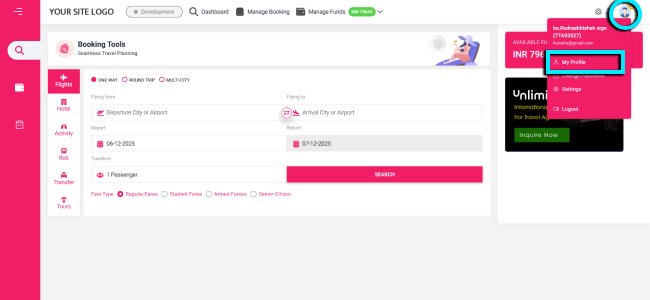
1. Login to your back office and navigate to Profile icon > My Profile
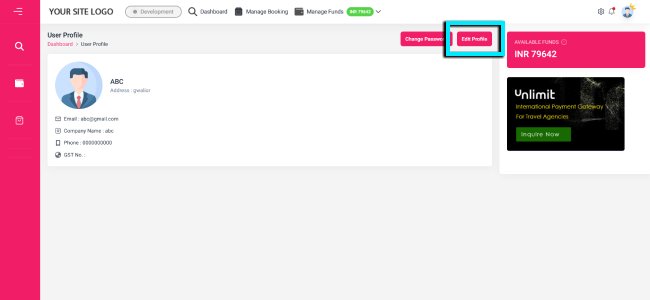
2. Click the Edit button in the right hand side of the table
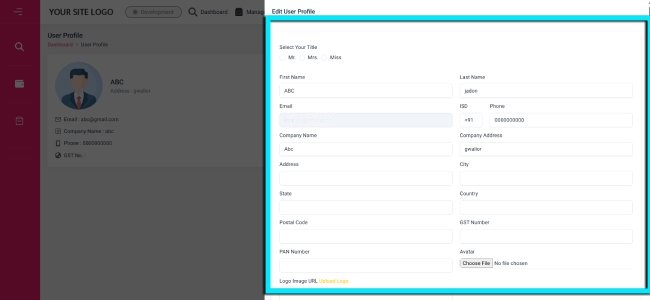
3. Edit your profile information
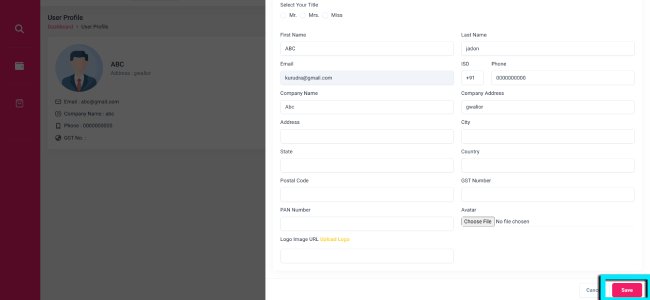
4. Click Save and you are now done.
- Setup & Installation
- glideFares Travel Platform
- How It Works
- WordPress Plugin
- White Label Portal
- Cross-Platform Widgets/SDK
- B2B Travel Platform
- Mobile APP Builder
- APP Store
- Manage Wallet
- Load Funds
- Transaction History
- Back Office
- Global Settings
- Change Password
- Upload your logo
- My Bookings / Cancel Bookings
- Manage Profile
- Setting a Markup
- Customize Searchbox
- Custom Styling (CSS)
- Payment Gateway
- SMTP Settings
- Settings
- B2B
- Agency Registration
- Agency Account Activation
- Manage Agency Wallet
- Addons
- SMS Notifications
- Whatsapp Notifications
- Chatbot Settings
- Multicurrency
- Multilingual
- Travel Insurance
- Manage Cashback
- Manage Discount Coupons
- Meals & Baggages (SSR)
- Enable Taxation Module
- Photo Editor
- Geo Location based Currency
- Clubbed Flights
- Hide Passport
- Generate E-Ticket Manually
- Hold Bookings
- Many more ...