


Documentation - glideFares Travel Platform
Advance settings - B2C White Label Travel Portal
Home » Documentations » Advance settings
Take total control over the design by writing your own css through Advance settings.
- Exclude " style " tags
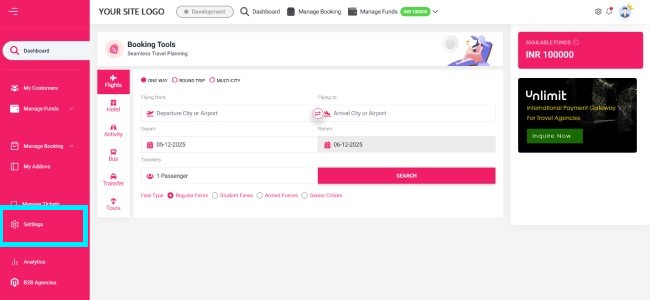
1. Login to your back office and navigate to Settings.
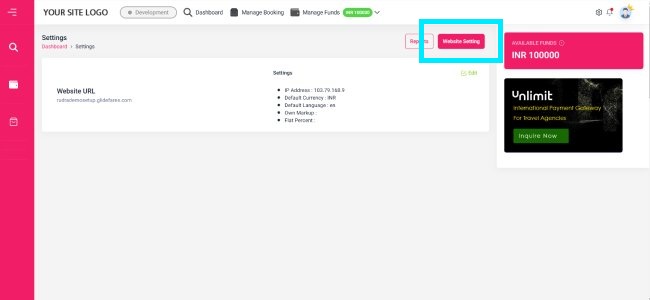
2. Then click on Website Setting.
3. Then click on Advance Setting.
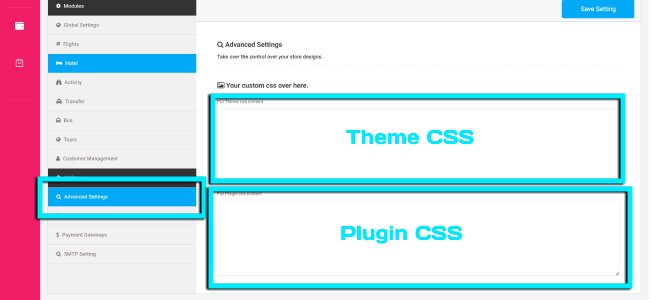
- Theme Css: The css written would be applicable on the theme part, ie, Header, Footer, home page and informational pages.
- Plugin Css: As the name suggests, it would be applicable on the booking engine elements, ie, Search box, Search Results, Booking and Confirmation pages.
- Setup & Installation
- glideFares Travel Platform
- How It Works
- WordPress Plugin
- White Label Portal
- Cross-Platform Widgets/SDK
- B2B Travel Platform
- Mobile APP Builder
- APP Store
- Manage Wallet
- Load Funds
- Transaction History
- Back Office
- Global Settings
- Change Password
- Upload your logo
- My Bookings / Cancel Bookings
- Manage Profile
- Setting a Markup
- Customize Searchbox
- Custom Styling (CSS)
- Payment Gateway
- SMTP Settings
- Settings
- B2B
- Agency Registration
- Agency Account Activation
- Manage Agency Wallet
- Addons
- SMS Notifications
- Whatsapp Notifications
- Chatbot Settings
- Multicurrency
- Multilingual
- Travel Insurance
- Manage Cashback
- Manage Discount Coupons
- Meals & Baggages (SSR)
- Enable Taxation Module
- Photo Editor
- Geo Location based Currency
- Clubbed Flights
- Hide Passport
- Generate E-Ticket Manually
- Hold Bookings
- Many more ...